On-page SEO is one of the most important parts of search engine optimization. It refers to all the actions you take directly on your website to improve its visibility in search engines like Google. If done correctly, on-page SEO helps your content rank higher, attract more traffic, and provide a better user experience.
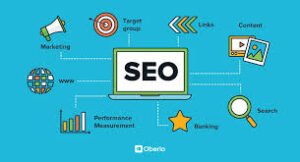
What is On-Page SEO?
On-page SEO involves optimizing individual web pages so they rank higher and earn more relevant traffic. It includes both content optimization and HTML source code improvements.
Unlike off-page SEO (like backlinks), on-page SEO is fully in your control.
Why On-Page SEO is Important
Search engines like Google use complex algorithms to understand your content. Proper on-page optimization helps them:
- Understand what your page is about
- Determine if it matches user search intent
- Rank your content appropriately
Without on-page SEO, even great content can go unnoticed.
Key Elements of On-Page SEO
1. Keyword Research & Placement
Start by finding the right keywords using tools like Google Keyword Planner.
Use your main keyword naturally in:
- Title
- Headings (H1, H2, H3)
- URL
- First 100 words
- Meta description
Avoid keyword stuffing—keep it natural and readable.
2. Title Tag Optimization
Your title tag is the first thing users see in search results.
Best practices:
- Keep it under 60 characters
- Include your primary keyword
- Make it engaging and clickable
Example:
“On-Page SEO Guide: Boost Your Rankings Fast”
3. Meta Description
A well-written meta description improves click-through rate.
- Keep it under 160 characters
- Include your keyword
- Write compelling copy
4. URL Structure
Clean and simple URLs are better for SEO.
Good URL:
yourwebsite.com/on-page-seo-guide
Bad URL:
yourwebsite.com/page?id=12345
5. Header Tags (H1, H2, H3)
Use headers to structure your content.
- H1: Main title (only one)
- H2: Main sections
- H3: Sub-sections
This helps both users and search engines understand your content.
6. Content Quality
Content is the backbone of SEO.
Your content should be:
- Original
- Informative
- Easy to read
- Focused on user intent
Search engines prioritize helpful content that solves real problems.
7. Image Optimization
Images improve engagement but must be optimized.
- Use descriptive file names
- Add ALT text
- Compress images for fast loading
8. Internal Linking
Linking to other pages on your website helps:
- Improve navigation
- Pass SEO value
- Keep users on your site longer
9. Mobile-Friendliness
Most users browse on mobile devices. Your site must be responsive.
Google uses mobile-first indexing, meaning it primarily uses the mobile version of your site for ranking.
10. Page Speed Optimization
Fast-loading pages improve user experience and rankings.
You can test speed using Google PageSpeed Insights.
Bonus Tips for Better On-Page SEO
- Use schema markup
- Optimize for featured snippets
- Add FAQ sections
- Improve readability (short paragraphs, bullet points)
- Use engaging visuals
Common On-Page SEO Mistakes to Avoid
- Keyword stuffing
- Duplicate content
- Missing meta tags
- Slow loading pages
- Poor mobile design
Final Thoughts
On-page SEO is not a one-time task—it’s an ongoing process. By consistently optimizing your content and website structure, you can improve your rankings, attract more visitors, and grow your online presence.
If you focus on providing value and follow best practices, search engines like Google will reward your efforts over time.